Does your Web site contain authority content? Does your Web site’s content match what people are searching for now?
Does the thought of making Web page updates create feelings of panic or hopelessness?
In this article, we’ll go over a strategy you can implement quickly that will raise your search rankings and hook new visitors with the information they want.
Authority Content
To begin, authority content is a Web page that demonstrates your expertise. It provides in-depth information meant to offer readers insights and solutions. It is a more sophisticated way to promote your product or service, and it boosts your company brand and your Web site’s traffic.
Google’s search for authoritative content does not mean you have to start fresh, though. You can improve performance simply by updating your SEO strategy and tweaking your current pages.
Google’s algorithm continues to evolve. Voice and artificial intelligence have transformed the search environment. Below are the steps you can take to help your Web site rank higher quickly and easily.
The Content-Focused Audit
What worked in the past is old hat. You need to look at your content strategy in a new, dynamic way.
This is where a content-focused audit comes in.
It’s purpose is to find a key point of departure: Where are you ranking now compared with where you need to rack to land more visitors using search?
Once you know this, you begin the process by using a tool called a word cloud.
It begins with uncovering winning keyword(s) that will improve your search rankings plus other ranking terms that describe the same or similar concept. Here’s an example:
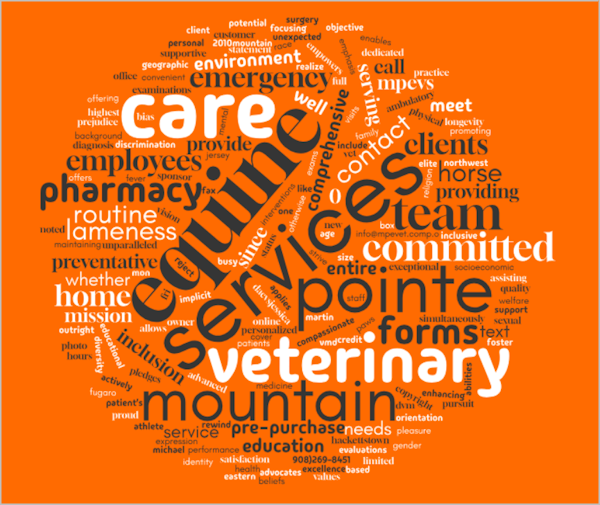
A word cloud is not free association nor is it a writer’s tool to kickstart a new paragraph.
This word cloud specifically targets words and phrases gathered by search engine analysis. It is a central term around which other terms that relate to your product or service online.
These words focus on what is trending in your industry based on search interest. There is a known audience that wants (or will want) the same information from you.
SEO analytics will provide further guidance. Pages with good traffic have a higher level of trust with search engines. These are the pages that are good candidates for re-optimization.
The Auditing Process
Once you have a word cloud of effective keywords, you can begin your content audit:
- On-Page Content – Look for pages that hold the most potential with high impressions or click-through rates to identify pages for optimization. Look for any content that lacks substance or falls short of traffic goals. Consider revamping these pages and see how people respond.
- Images – How do your images affect the site speed? Look at the file size of your images and whether the title and alt-text fields are optimized for new keywords.
- Inbound Referrals – Your content inventory is not only what is on your Web site now. It also includes the PR articles linking back to it. Audit your referrals to see which links are driving the most traffic to your Web site. Look for any areas to improve the flow.
- Legacy Content – Create a spreadsheet that details legacy content such as posters, trade shows displays or other printed materials. These may not be online but may prove useful for strengthening your landing pages.
A Word about Words
There isn’t a single “right” word count for a Web page.
There’s evidence that longer content tends to rank higher because there is more room to add key words. How much text or media used really depends upon the page type, its search intent, and how the page is structured.
Always put content quality and a great user experience at the top of the to-do list. Don’t just add words to pad your page content. Search engine A.I. will spot it and demote the fluff accordingly.
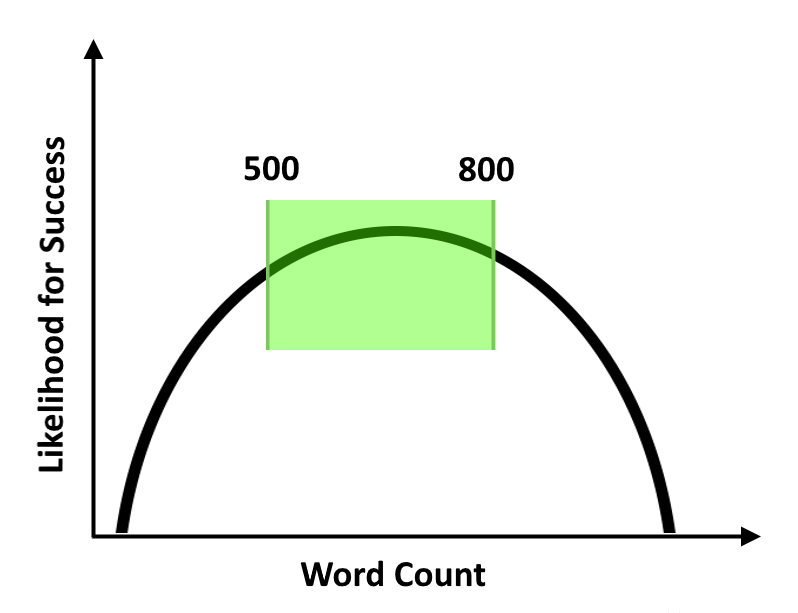
As a general rule of thumb: 500-800 words will be an ideal length for most Web pages. More than that will depend upon the page type and purpose.
Page Type
- Landing Pages: 50-200 words will persuade visitors to click a button or request information.
- Product Pages: 300-500 words will adequately describe simple products. Use a longer format for more complex items.
- Guides & Tutorials: 2,000 words or more of comprehensive information and detail.
- Blog Posts: 1,500-2,500 words with high-quality content combined with ranking keywords to attract visitors.
Search Intent
Google’s algorithm aims to understand each user’s search intent. Longer content helps the algorithm gain a clearer understanding of what your page is about. Use your keyword cloud (see above) as idea fodder for related topics and desired content.
Readability
While longer content is generally preferred it is also important that your new content is readable.
The most effective way to do this is by breaking it up long text segments. This means organizing your page so that it is easy to scan by using headings, subheadings, visuals, captions, and short paragraphs.
Reading difficulty scales, like Flesch Reading Ease and Flesch-Kincaid Grade Level, measure how easy a text is to read. These scores help determine the audience for a piece of writing.
Flesch Reading Ease ranges from 0 to 100, with higher scores indicating easier readability. The Flesch-Kincaid Grade Level correlates text to the U.S. school grade level needed for comprehension.
Link to the Flesch-Kincaid online calculator: https://goodcalculators.com/flesch-kincaid-calculator/
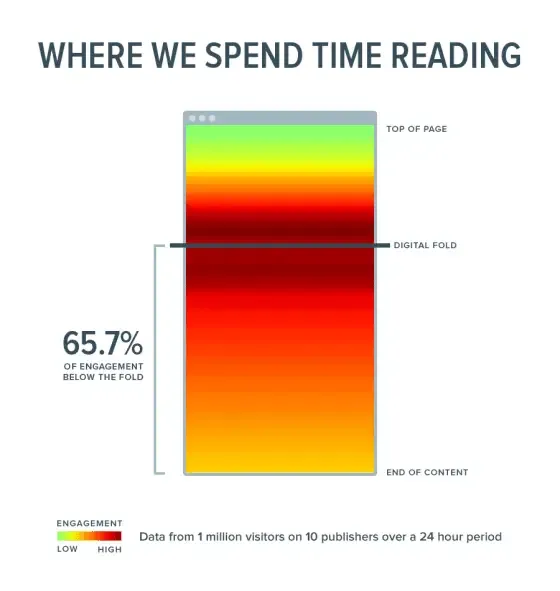
And here’s a tip: Start you content slightly above the ‘digital fold’ and let users scroll into the page, as shown below.
Focus on Quality Links
When optimizing content begin by updating your backlinks.
Google favors Web sites with inbound promotional links and referrals from reputable sources. Start by removing any toxic Web sites that hinder your SEO efforts. For the remaining links, decide on a few tweaks to enhance keyword presence.
Next, reach out to the referring Web site with minor tips to improve their page structure. For example, ask your referrer to, “Please add keywords for the H2 and H3 headers.” This will preserve the link while you renovate other page content.
Don’t forget about interlinking. Follow a siloed approach to link internal pages within your own Web site to keep your audience engaged.
Finally, sprinkle in some useful (and relevant) outbound links to boost the authority of your content. By linking to relevant sites, you strengthen your own credibility.
Consider UX
When the need for better page content goes head-to-head with design, it is design that usually wins.
That’s a mistake. What your page content says is just as important as how it is presented.
Search engines reward sites with a quality User Experience (UX). This means offering quality content along with a well-designed site structure. The two work hand-in-hand.
If you have a savvy developer or are using a C.M. product like Yoast, the content process is pretty much automated. However, designers and developers need a break after working on the back-end of a content management system.
This often comes at the expense of SEO. Be sure your SEO specialist is involved with the development team and sticks to the improvements discovered by the page audit
Remember the SEO environment is evolving. Keep your fingers on the SEO pulse and you’ll give your Web site your content a competitive edge.
You don’t need new content to have a great Web site. Retool what you have. Your visitors will thank you.